

In this conversation Trevor Boland talks to me about the potential of Assistive Technology (AT) to support everyone’s learning. He gives great tips for both students and educators before walking us through his latest Assistive Technology support, the AT8.
Resources from this episode
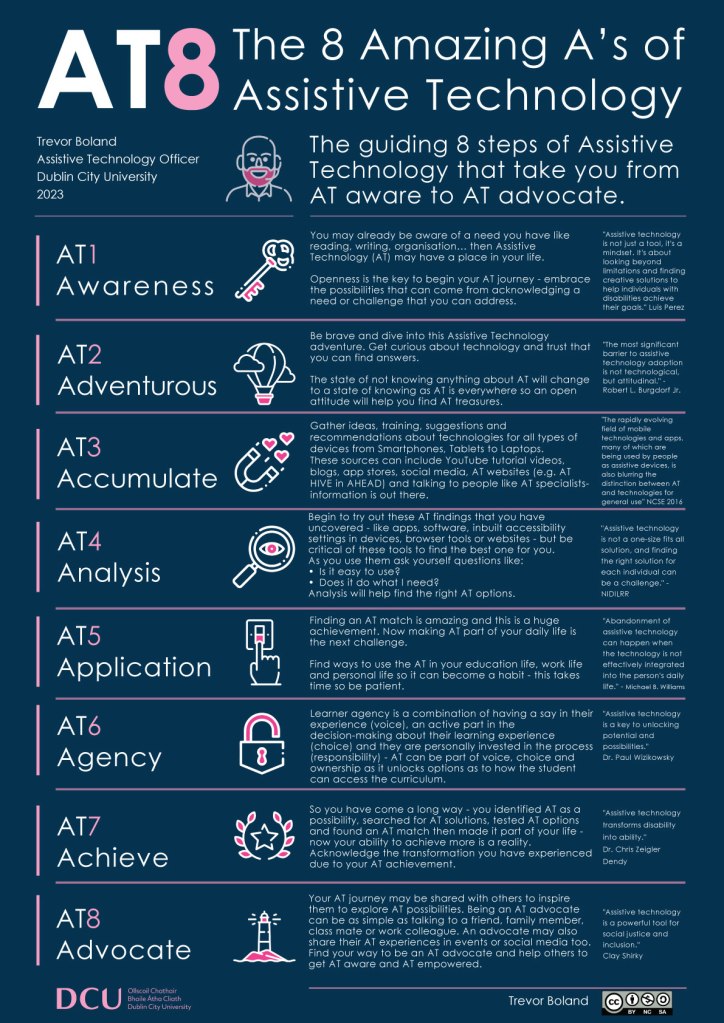
AT8 Poster
Transcript of this episode
SUMMARY KEYWORDS
Assistive Technology, inclusion, accessible ,UDL.
SPEAKERS
Trevor Boland, Mags
Mags 00:01
Welcome to Talking about all thing’s inclusion! A Podcast where I get to meet and learn from people in the field of inclusion – in its broadest sense – that inspire me. I hope they’ll inspire you too! Today, I am talking with Trevor Boland. Trevor has been working in Education for over 20 years across primary, secondary and higher education and is without a doubt an advocate of inclusive technology for all as it supports belonging in education. He has also worked in AHEAD, an Irish NGO that advocate Universal Design for Learning, delivering workshops and creating courses about UDL and Accessibility and a led a national AT event called GATHER. Currently he is the Assistive Technology Officer in Dublin City University where he supports students technology needs in different learning contexts. He has a mixed bag of skills from his experiences and continues to support inclusive approaches as he will be rolling out Accessibility and Inclusive Technology workshops to staff in DCU. Trevor, we became fast friends over discussions about technology and its role in inclusion. We’ve chatted about the language we use when discussing AT, or as we’ve often called it inclusive technology. And your take on how we view and engage with technology as an inclusion tool is refreshing. That’s why I am so delighted to have you on the Podcast today to speak with you more about your wealth of experience with assistive/inclusive technology and where you envisage this going in the future.
Trevor Boland 01:39
Mags, thank you so much for inviting me along. It’s a pleasure to be here. I mean, it’s well, first, it’s always great to have a conversation with you. And second of all, even better to have a chat about assistive technology. So thank you for this opportunity.
Mags 01:54
Trevor, it’s a pleasure to have you here to share that wealth of knowledge that you have. Trevor, can you start off by telling us a little bit about yourself, your background, and what it was that inspired you to explore assistive technology in the area of inclusion?
Trevor Boland 02:11
Okay, um, well, I suppose, like many people will, or definitely me. It was kind of an accident how I got into education. Because going back as far as my teenage years, I was involved in, like summer camps for students with disability students. So it was kind of always aware of that kind of support and need and just that kind of, well, I was suppose drawn to that type of work. And then when I went to art college, you know, Iearned some design skills, and then after art college, I got into technology, and did a master’s in multimedia. And then somehow the assistive technology role came about throughout my experiences. And it seemed to merge that whole disability, design technology kind of traits within me. And that’s why I’ve kind of stayed really within the sector, because not only is about engaging with the students and working with them, but it’s about sometimes designing for those students to and chatting about what it is they want and what it is that they desire that the item looks like, and then kind of bringing all these things through, you know, in the form of technology, where just communicate technology or create technology. And that’s been kind of an interesting flux of roads to kind of meet students on and have these kind of, I suppose technology adventures really with students while we explore technology and all these different facets. So that’s it in a nutshell.
03:50
I love that little phrase, technology adventure. And, Trevor, as you were talking there, considering your role as an Assistive Technology Officer, you never once spoke about yourself, you spoke about your students, and you spoke about communication with your students about engaging with your students, and about finding out what they want and what they desire. It was never about special educational needs or deficits, or what they couldn’t access. It was all about their wants, their desires, and accessing their curriculum. Can you speak more to that?
04:31
Yeah, I could speak way too much about that. And yeah, so that because it’s it’s it’s such a big topic now, especially in this post pandemic, kind of world that we’ve been kind of left with. That whole notion of engaging with the students now whether they have or don’t have disabilities is an interesting topic. Nevermind the old days where we just spoke about more. Well, in my context anyway about students who just had disabilities but I suppose never has there been a time especially since I returned to university, or working within university about seven months ago that the enigma of connecting with students is just one that I am trying to like to figure out with my work colleagues. And you know, we’re coming up with ideas, possibilities about why these are happening. We’re talking to students, and we’re getting insights about why they are aren’t talking to us or communicating as much as before. So, and the other thing as I’m getting older, the more dinosaur like I’m becoming. So I find that if I don’t keep asking questions and staff about how students think and behave, that I’m going to make myself redundant if I don’t keep curious about them. So that’s been a big driver of mine. And even that whole thing about the labelling of disabilities, yeah, I just find. And this is why I’m drawn to the term inclusive technology, because whether you do or you don’t have a disability, I think there’s a place for inclusive technology for everyone, like staff or students or people day to day. And to me the awareness bit and the communication bit about includes technology or assistive technology is, as I’m getting older, it’s kind of crystallising about why there’s potentially a gap developing around awareness surrounds assistive technology, and that social media is really making me feel very dinosaur like, and I see an absence in social media about assistive technology. So I don’t know why there’s like this amazing flux of information, you know, on social media, and websites, and TV and streaming. But the topic of assistive technology has never gripped, like mainstream media. Like even when you think of Ireland and you think of students with assistive technology, you don’t think of a face, you don’t think of a name of someone. And it’s one. And this particular issue is only kind of becoming apparent to me in the last few months, talking to people like Siobhan Long in Enable Ireland and that we have like we have people with disabilities. But somehow that whole topic of assistive technology hasn’t kind of really ever come to the surface in a clear way. So that’s something that I’m trying to figure out now. And why it’s just never kind of taken off. But it might be that’s a whole different podcast.
Mags 07:35
It’s led me to asking you a question about it. And we spoke about this before that the whole assistive technology terminology actually did come from a deficit space, it came from students with disabilities, and you had to meet certain disability criteria to get access to assistive technology, and now for for generations after us Trevor. Because I’m with you and the dinosaur age. Technology is just technology. Yeah, and maybe that’s it maybe like maybe they’re seeing what I don’t see, because you opened my eyes to how technology is used in all aspects of our of our lives, not just in education, you’ve broken it down very simply, to your three levels of assistive technology, to show that it’s for everyone. It’s not just for the few who we have labelled need us.
Trevor Boland 08:34
Yeah, and actually, that’s- I know the slide you’re thinking of, and it’s a slide that I keep showing over and over again, because it just has that eureka moment where people sometimes think assistive technology is about other people, not about them, they’ve never seen it or heard of it before. But that particular slide where I showed those three levels, where you know, assistive technology involves anything from like my own eyeglasses that I wear that assist me to see better, to remote controls to calculators, to google home devices, all these different tools that we have around us, including smartphones do so much that assist us in our everyday life. And then I think when we realise that something, an unfortunate misjustice has happened to this term of assistive technology that has been kind of not included in that supportive equation. So unfortunately, then we’ve grown up our whole lives around these assistive technologies, not labelling it so we’ve gone through education, especially as older people, you know, without that kind of term, exposed to us, and then all of a sudden, we’re getting students in higher ed, who are all of a sudden experiencing the term assistive technology. What’s this? What’s an Assistive Technology Officer, and then there’s this kind of like cultural gap that then has to be, you know, filled and explained and expressed and then guide it, you know, so the student then realises what your role is, and the purpose of the technology. So, so just, it’s one that I don’t know why, just from a society point of view, we’ve kind of left out this kind of vacuum of assistive technology. And if anything, I think he’s got so much potential now, especially as these includes technologies. They’re everywhere on phones and your Microsoft suites, your Google suites and different websites, and that there’s never been a more powerful time to release and make assistive technology relatable to people. So So hopefully, this is where the vacuum becomes filled. And then we can populate it with all these people and ideas and identities that makes us as technology relatable to people, rather than tangible. So yeah, soon as i said that I just got terrified. Sounds bigger than I thought, yeah, okay.
Mags 11:02
Yeah, because we’ve had the conversation. So like, I’m gonna hold my hand up here and say, when we first started having these conversations, I was against the term assistive technology, because in school, I had seen how it would other students. How students, but different, how they were carrying around the dinosaur laptops, and the battery and the big black bag. So everything about them looked different, because they had assistive technology. And then we moved to tablet schools, where all of a sudden, everyone was using the tablet. And sometimes the person who had first had the assistive technology was still carrying around the big laptop, because that’s what the Department said that student had to use. So I think that’s the gap. And that’s where I mean, you brought me out of that, that space into the wider No, let’s see how we can use this for everyone.
Trevor Boland 11:59
Yeah, because like, you know, like, iPads are so powerful now, and lightweight. And students have iPhones, and there’s so many kinds of inclusive tools and those that, you know, that even and this is even the thing about assistive technology that I find, like that whole message of how assistive technology is in your pocket. And that, you know, you can take out your device, you know, but, you know, potentially just, it’s never been explored, or that curiosity about technology has never been kind of exposed or inspired or fed. That there’s the potential of technology that just hasn’t been explored. So, so yeah. So especially with one thing, but there’s many things about young people that I think are inspiring, but their, the way they own disability now can be quite inspiring. And the way that I think that kind of stigma, is disappearing, and I’ve seen it disappearing over time. Where I think, you know, there really is the scope to really, like, take these students and, you know, take that voice that they have, that’s becoming like, so much more powerful. Like when I think of me when I was a college student, think I was quite meek and shy, and I didn’t really know who I was. But now students have like that age between 18 and 21, they are so much more clued in, in a lot of ways to who they are and what their tribe is, and what motivates them. That if we can just get that little bit of 80 in with that identity. I think that’s where those students then can really kind of Ignite assistive technology for older students. So I haven’t cracked that just yet. But I’m sure there’s an answer to it.
Mags 14:01
I’m gonna throw another layer in there Trevor if you don’t mind. And that is as educators embracing AT as part of our identity, because it’s a huge part of ensuring that every student can access the curriculum and can access the content that we’re teaching. From, from the very basics and in how we going back to one of your words how we design or PowerPoint presentations. Could you talk to some of those practicalities? You know, top tips for educators to make all of this accessible? Not putting the responsibility on the student to access it?
Trevor Boland 14:46
Okay, that’s a big question. Okay, so um, so I suppose for me, PowerPoint has become this amazing, big, powerful tool that goes beyond even making a PowerPoint in the first place. I Um, like there’s, you know, that whole issue of accessibility but which is key, really the foundation to making assistive technology work, if materials are creative and accessible ways, so things like simple things like, you know, making sure your PowerPoint slides have a proper heading on them. So students who are blind can activate their screen reader. And their screen reader will just flick through the headings of slides. And that gives them way more access to the slide content. And like that, just even things like alt text or alternative text for images. As educators, this sounds like a really daunting task, you know, to add, manually alt text within an image. So students, again, who were blind, can identify the content of images. But you know, after a few gos, and after the fear of getting our text wrong, which I think is a lot of people’s fears about I’ll text that, you know, you realise, and even by talking to students who are blind that really just wants, you know, I find really bare bones information, like just get to the point of whatever it is the image is about, and I don’t need to know every detail, just tell me what’s significant in the image. That’s a big plus, I think, like always remembering just to, yeah, keep your slides, you know, succinct, and keep the text as minimal as possible, which is very hard. There’s three slides I’ve created before that, you know, I have it a task to try and, you know, share with fewer words. But, you know, finding a style that mixes images and text, and even things like colour contrast, as well. So your slides are visible, especially to students, because even like students who are visually impaired, you know, partially sighted, you know, it makes a big difference. When slides have really strong like, I always go for a dark background and white text. And students with visual impairments really like that, because it’s a really strong contrast. So I try to have a particular formula with that. And then once you have your formula down, then you can just repeat this over and over again, for every single slideshow you make for the rest of your life. You know, and that’s going to be a lot of slides. So, so yeah, once you figure out what that formula is for you about making your slides accessible, really, it’s just a skill you’re going to transfer for the rest of your life. And that’s going to benefit all of your students, you know, from your teaching. Yeah, like it’s a win win I think
Mags 17:32
it’s a huge one isn’t it, because even your, your, your speaking there about students who are blind or visually impaired. But even for students who might have difficulty hearing, if you turn on the subtitles,
Trevor Boland 17:44
Oh, yeah. And even students, like, I have, unfortunately, forgot my glasses. So for students who might be like me and forget to bring their glasses, like a strong contrast, slide pack is a great one. And like, that’s even the benefits of say, you know, trying to pare down these bullet points and that benefit students with dyslexia. So they can just, you know, target that key information. And then students with ADHD, if you just pare down the key information, you know, to the slides, again, that makes the slides more accessible in terms of someone being able to skim them to read them to get the essence of the content, as well. So and then for students and benefit students who may not be aware that they have a disability. You know, we see ADHD is definitely becoming something that’s much more in focus now. We’re seeing a lot of students registering so so for a lot of students, they don’t know or they suspect they have ADHD, as well as dyslexia, as well, that’s, that’s always out there. But yeah, making your information as accessible as possible, really does help, and the big buy in as well with that is that if your slides are accessible as possible, and as understandable as possible to your students, then you get a lot less emails from students asking you to clarify information. So that’s the win win situation, fewer emails from students asking you for clear information. Yeah. That I think is a definite win.
Mags 19:11
Well, that’s the sentence that will have sold educaters across the country, less emails from your students
Trevor Boland 19:18
Teah less emails about what does this mean?
Mags 19:21
Yeah, absolutely. Trevor, we honed in on PowerPoint, because I asked I brought our PowerPoint. But again, when you were with a head, you did a mountain of work around assistive technology. And again, sometimes if if educators aren’t thinking outside of special education needs, they may not think to be going looking at this technology for use in the wider classroom. So maybe you might just tell us a little bit about what’s out there that might encourage people to go love in that direction.
Trevor Boland 19:55
Okay, well, like PowerPoint has become a very dynamic so there is the possibility in PowerPoint now to dictate your content, so with your voice, you can dictate your content. And then because Immersive Reader, which is this fantastic reading tool in PowerPoint, as well as words and all the Microsoft stuff, that it can read back your information really effectively, so that not only helps you to hear the information and to comprehend it better, but also to proofread your information as well. Because some people are better at proof listening than proofreading. And in that case, these immersive reader tools are great, as well. And then there’s another tool in PowerPoint. And you might just wonder why I’m going to talk about this one inside, but I’ll explain. So there’s like a, like a coach tool in PowerPoint, so you can practice your presentation. And then PowerPoint will give you feedback on the pace at which you spoke, the maybe the inclusive language used yourself whether you read verbatim off the slides or whether you didn’t, and then you know, gives you a few kind of like maybe tips about how to adjust your presentation next time. And I think this one has really caught traction with a few staff that I’ve spoken to last few months in DCU, which is really about I suppose students have fears now about presenting anxieties about presenting. So anything that supports students to practice presentations is key. And then getting back to your point, like so IT staff, I think staff are in such a powerful position to be able to model that use of assistive technology or inclusive technology in their classrooms. So whether it’s using the dictation dictation tool in PowerPoint, or in Word, and in front of your students create a slide using dictation to write the content but in as I think if students saw someone that wasn’t Assistive Technology Officer, using these tools in a real life context, you know, to make everyday things like a slide or a Word document content, I think that’s a really powerful message to educators, especially now we have either Microsoft or Google tools. And all they do there in the classroom, they probably have the Microsoft open within their laptop or computer that you’re using in the classroom. And to take just a moment else, just to maybe dictate something in a Word document or PowerPoint would really I think, make it is technology so real to students that I think it would be even far more powerful that I could do, you know, talking one to one to an educator or student because like that’s, I mean, that in its way would kind of say that, you know, we’re finally here and inclusive technology is available to everyone, including educators. And now we can be so blase and casual about this, I’m just going to use inclusive technology to make written content to my slides. I think, I don’t think we’re there yet. I don’t that message or that, or maybe sometimes educators as well. Maybe, maybe sometimes we forget how powerful our roles are to students, you know, when it comes to modelling behaviours, and I really think if that was modelled, even by myself now that I think it I think I need to find more excuses to model the use of creating slides, using dictation with my voice with students, I think would really change how we think and talk about these includes technologies in these everyday tools that we have. And like that would just be a step closer to making AT more real to people, or more accessible in terms of our day to day conversations.
Mags 23:46
Yeah, I think you’re right, like educators hold so much power in their hands in terms of what they can model and what they can demonstrate to their students. And it’s really interesting. Like, I use AT within my classroom presentation, that as come naturally to me, and I’m modelling them and I’m modelling them well. But actually, I never thought to go back, as you said, and show the students how they can do it as well. So it’s all well and good if I’m modelling subtitles, but if they don’t know how, where to find them, it’s a little hidden button if you don’t know it very well. So I’ve learned something for next year when I use something new. I’m actually going to stop and show the students how they can do it. But when you’re talking about our roles as educators, when in that it brings us nicely to just I think two weeks ago, you’ve designed the amazing AT8
Trevor Boland 24:46
Yeah, no, I mean, I’m a little bit excited about that. So I’m going to try to contain my excitement.
24:51
Cann I just say I’m more than a little bit excited. I think it’s amazing, but I think actually, when I was reading that I was going, this would remove some of the fear from educators about where you can start and where you can be. But I’m not going to give my views I want you to tell us about it, please. And be excited.
25:15
Yeah, well, okay, so I have freedom to be excited, okay, this, this could go anywhere. So, um, so like the idea, it kind of came about just only a few weeks ago, because I think that the last six or seven months in education have really stumped me about how to really connect with students more in this post COVID kind of teaching and learning environment that we’re in. So basically, I looked over the last few years of, like, teaching or showing and using assistive technology. And I was just thinking, like, I have the same conversations with so many students about, you know, showing them at how to buy into, here’s how it has to be like, not something you just wants off, but like, you know, making this a habit, making it real for yourself, and, you know, almost like creating a relationship with this technology. So you know, you, you know, it’s perks, you know, its strengths, its weaknesses, and you know, you buy into it, and then hopefully use it every day, or at least a number of times a week. And then, you know, realise that there’s a benefit that comes with this kind of relationship that you build with technology. So this, then this AT8 came about, because I realise I need a simple, snappy, effective way of communicating this kind of stage, like our milestone, like, series of events that happen when you come from, like, at awareness. And for lots of people, they’re still like, at that stage ofA awareness to like, kind of getting stuck in trying it, you know, especially because stage two I had as being adventurous as the second stage of the AT8. And really, that was about like, all those student conversations I’ve had over the years about students being fearful of technology being like that word technophobic, that keeps coming up repeatedly. And actually, in more recent times, it’s maybe just like, trying to get students curious about assistive technology, you know, especially because it’s just accessible so easily in all these everyday tools and devices that they have. And then to not be like worried about, like gathering a suite of these tools like personalising their learning, and accumulating so that third AT, these kinds of tools and create like, this means this toolkit that they can develop themselves, maybe along with their assistive technology officer, and at officers, we love helping students out with that. But also, you know, through maybe even talking with their peers, as well about what tools they use. And then that fourth stage, which is about analysis, like encouraging the students to actually be critical of the tools, because the good thing about being critical about these tools is that there is definitely now another tool out there that they can try out. So if something doesn’t work, that’s okay. You tried it, it didn’t work, we can find another. So now we can, we’re like, it’s like, so like, I’m trying to use avoid the word spoiled. But we’re so it’s just so available there, you know, that right match for that right tool, it’s out there somewhere, we can definitely find us. And then in terms of that application, to really invest to go beyond the, you know, just using a tee for that one point in time. But to actually, you know, find a way of using of repeatedly that habits that you can build into yourself, that’s really the the next step, which I find can be really challenging for students, because really, when you do kind of buy into it and use it, that’s when all these amazing things happen. This kind of like agency, as I call it for the sixth stage, really, it’s about that students then kind of taking down those barriers to their own learning really. And then being in control of those strengths. And maybe those weaknesses that they have, and knowing the technologies they have around with them, knowing when and what tool to use for the right time, the right task, give them like agency over those kinds of tasks that they are going to experience whether it’s in the academic world, or whether in the work world, or work experience or even in the personal life. These tools can not only help academic studies, but bleed into other parts of the life as well, which I think is even more powerful. And then hopefully, the students will achieve, which is great, you know, they’re becoming more powerful, you know, through their mastery of technology. And then hopefully, and there was the student who inspired me to have the word advocates I met for that student on the day, I launched AT8, which was just a weird coincidence. So definitely tha’s destiny. So that student, because I had the amazing experience of working with the students on an assistive technology project that we funded. And that student has definitely become an advocate of technology from those experience. So the dream is that we can take, like, students show them this kind of roadmap of assistive technology. And I suppose, take away the mystery of assistive technology, and take that shroud down and just show them this kind of tour and journey and adventure that can happen when we start thinking about technology and using it and adapting it into our world. And then making it part of ourselves and empowering ourselves through it. And then maybe even talking to other people. And advocacy could be something as simple as a chat with a friend or a family member, or anything from being a big advocate on social media, and, you know, going into talks and maybe even go into podcasts, with amazing people like yourself. So So really, it can take any shape or form. So I’m hoping, and my dream and my aspiration of the AT8 is that it’s going to maybe help these conversations about assistive technology, whether with practitioners or students or, or educators, and just show them kind of really an explain actually what an assistive technology officer does as well, which, which always kind of helps I find, but the bullet is in a nutshell, really for the AT8 is
Mags 31:38
that you had the student that inspired us, isn’t that just like, wow,
Trevor Boland 31:42
yeah, that was the I was actually a little bit blown away, because like, we had an assistive technology event in DCU last week, and the student showed up. And it was like, it was so weird, because the student now is working in a school. And I have to admit, like, when the students arrived, I just thought this is just really strange coincidence, but like it was, it was amazing. And it was amazing to talk to the student, um, who’s now working in the education sector, and how they are still advocating this technology, and they’re out there doing it. So you know, it’s, it’s, it’s real. advocation is real when we work with our students, and we support them and help them and give them these positive experiences. Yeah, they can share.
Mags 32:26
Trevor, we’ve used the acronym AT8 , through this part, would you mind given the full title for our listeners?
Trevor Boland 32:34
Absolutely. Yeah. So basically, it’s just assistive technology 8 . So it’s about those eight steps or stages or milestones that really kind of takes someone from AT awareness. So that first stage is awareness all the way through these eight stages to get to that final stage of advocation, to advocate for the power of assistive technology. So I’m, as I was saying, the hope is that this AT8, kind of really takes that mystery away from assistive technology, that journey that happens for the student.
Mags 33:11
Absolutely. I know, you designed it with students in mind, with learners in mind. And I came from it from an educator perspective, but also a learner, because I’m learning about AT. So while it was designed for students, there is so so so a place for it for educators, as we’re learning about AT in our journey to make everything accessible for our students, Trevor, on that note of accessibility, because I know you’re also huge UDL advocate, can you draw the dots for us between UDL and AT, assistivetechnology?
Trevor Boland 33:55
Absolutely. Well, well, the amazing David Rose, who you might have heard of in the UDL world.. He is like spectacular and has written this amazing piece about that, I suppose relationship or the convergence of assistive technology and accessibility. And really, that’s a piece actually that I keep going back to that early piece that he wrote, because he illustrates really well how, without accessible, or accessibility, we have assistive technologies that are less effective. So basically, our assistive technologies need say, for example, like text that’s typed or written, so like screen readers, and that can can kind of read the individual letters. So and as results then those students can access, you know, the curriculum. They can, you know, basically learn on an equal footing to all their peers, as well which is good One of the key parts really of this technology is to give a tool or tools to a student, that gives them the fullest experience that they can have IN education. So that looks different for different students. So for some students with dyslexia, they may use something called a read aloud tool that reads out texts to them if reading is their barrier. And then other tools, like note taking tools are really effective for students now, because sometimes you’re taking is something that they struggle with, because, you know, actually Note taking is quite a complex thing that happens, you know, you’re listening, trying to understand what lecture saying you’re typing your notes of what you interpret. So now these note taking tools help the students with disabilities, you know, to be more effective in managing the tasks that they’re able to do during note taking, and then be able to review their notes afterwards. So for example, recording audio is as always been a fantastic asset to students in terms of accessing the curriculum as fully as their peers who don’t have disabilities. And that, in itself, along with other technologies can definitely help students to access the curriculum more fully. So again, these assistive technologies, whether it’s for dyslexia, read aloud tools, or say, students with ADHD, who may just have challenges with notetaking, that these kinds of technologies give us options, really, which I suppose is the heart of UDL as well, that whole notion of choice is so embedded within UDL. And in a sense, that’s really what assistive technology does, it gives people choices and options about how they access the curriculum. And then as a result, yeah, they can become leaders in their own right about how they master their own learning. Yeah, so it’s quite powerful. overlapping between accessibility and 80 is, is so fundamental. And it’s even backed in such a powerful way now by the EU accessibility directive, which is really now getting educators and got so many groups, people now universities, like the communications teams, the technology departments and universities to think about online courses that they make their website material, the applications that they use themselves, are they all accessible to staff and students now, who would have disabilities? And if not, then they have to address it in some way. So there’s accountability now for accessibility, which will benefit staff and students. And that landscape is just starting to grow really in Ireland, because it’s only quite recently, really, when this EU directive came about. And as that evolves, we’re going to see, really those students who have been traditionally marginalised in education, you know, becoming much more included, in a really real way, about how much they can access of not only the digital environment, but the physical environment, everything I think is going to change in the next few years. Yeah,
Mags 38:30
absolutely. I don’t really, you talked about choice and agency there. And really, we can say, We’re accessible, if we’re not providing choice.
Trevor Boland 38:42
Yeah, like, I mean, that is like, I mean, that’s incredible. Like, choice is such a big word now. And a real l word to say in education. Because students can because even like, God, if I even think of an example, like there was a student to a mess three months ago, and he had like this 30 page, like it was a scanned document of a book that he got. So because we have sensors access, you know, I worked with the students and we use census access to upload the inaccessible scanned document to census access and census access, then was able to convert this huge document into an accessible word document where then the student with dyslexia could then use his read aloud tool to read back this 30 page document to him. So now we’re kind of at this time where really, we can converge all these tools together. So we can take something like an inaccessible document, make it accessible, and then use assistive technology with it in the space of like an hour. So while before you know, a scanned document, you’d maybe have to type it up yourself For you to have to use maybe a scanner that might have some kind of state of the art technology from the 90s in us, you know, while now, you know, it’s becoming faster, quicker, easier to make inaccessible things accessible. So yeah, I think there’s, it will get even more perfect, like even AI. I know, there’s a lot of chatter about AI now, but I’m quite positive about where I think AI is going to support accessibility as well. And when I think of these tools, kind of like senses access, you know, that can take something inaccessible and make it accessible. Like, I think that maybe AI will actually be even able to do things like that in a much more powerful and dynamic way. To help students, you know, access the curriculum, no, but even that’s, that’s a whole separate podcast as well in itself. But
Mags 40:53
I think there’s about three podcasts than in what we’re chatting about here today. And it’s also interesting. But unfortunately, we are coming to the end of this conversation. I know you and I tend to talk forever, before we talk about what we’re meant to be talking about. So I think we’ve done well today. So I’m just wondering, are there any resources for further independent earning that you would like to share with us today?
Trevor Boland 41:18
Yeah, well, I’m definitely something that during my time, in a hedge that I had the the fortunate experience of being supportive while I was in AHEAD, and was the AT hive. And the at hive is an assistive technology, I suppose repository and resource of I think it’s about 50 plus types of things that are considered either sis technology or inclusive technologies. And within that repository, or that hive of information, that there is also a means of answering three questions. So and those kinds of questions are kind of a way of kind of guiding you to match our to explore and assistive technology for very specific needs that you’re seeking. So say, if it’s reading, for example, you can go and explore these three questions and find tailored results for your search for even the specific device that you’re using as well, whether it’s a laptop, or smartphone, and that. So and that was done in conjunction, and we were so lucky with staff and students from further and higher education. And they informed us and told us everything that was wrong with it during all the stages of it. And as a result, hopefully, it came out okay, in the end. But it was it was an amazing, like exploration of how to not only make a resource about this technology, but to make a resource that made sense to other people do use when they’re trying to explore assistive technology. And we got so much feedback, especially even from ATI officers, as well, they were so good with their time to not only inform the content or tell us what was right or wrong with the content as well, which will kind of fade hopefully into making a tool or resource that’s usable. Really.
Mags 43:03
Yeah, it’s really useful. I mean, I had the opportunity for you to do a test run with me, so I could see everything there. And it is absolutely fantastic. And I put the link to that. At the end of the transcript for the podcasts, Trevor. I’m also hoping that we can throw up your AT8 poster as well so that people can see that.
Trevor Boland 43:24
Definitely and even buy it for your friends for Christmas. It makes a lovely present. Just put it a little frame makes a good gift.
Mags 43:35
Love it, Trevor. Trevor, any final words that you would like to share with everyone before we finish up?
Trevor Boland 43:44
Yeah, well, I suppose at the risk of sounding like I’m reiterating the AT8. And I suppose just be curious about technology, and what it can do. And don’t be afraid, whatever your role is to actually talk about assistive technology, whether it’s your personal life, like I talked about assistive technology to my partner, family, friends, nephews, nieces, you know, because in some way, you don’t know who’s going to resonate with you, about IT. And that’s the amazing things now about these conversations that you can have, you honestly don’t know who is going to all of a sudden start talking to you about a needs that they have to themselves are like a child that they have or someone they know or a neighbour or a friend. So and these are just experiences I’ve had. So like I think if more of us have these conversations, we help to first of all, de-stigmatise, that whole disability word. And de-stigmatise the assistive technology word and then even encourage people more to not only remove the stigma, but to like flip it and just own ui and to just like, really take power over it really, and embed into people’s lives or our own lives. So that’s the message I suppose I would. I’m definitely I and the other reason why I’m so interested in technology because I think it’s such a positive tool. You know, we hear so many negative things about technology. And I think assistive technology is the purest form of positivity when I think of technology, because its purpose is like, its exact purpose in life is to help us and like, and it has no other agenda, other than to help us and if we use us and our braved users, it is going to help us. So you know, it’s like an unconditional relationship that we can have, like, it’s gonna like, help us if we help this, you know, and that’s it. There’s no strings attached. Yeah.
Mags 45:43
I love that Trevor in unconditional relationship, where at sole purpose is to help us. I mean, there’s no better way. Compensation then on that note, I will say goodbye to everyone. Thank you so much for joining myself and Trevor for talking about all things inclusion, and I hope that you will all join me again soon. Thank you again, Trevor, for sharing with us today. Thank you
 Equity In Mind